
Hosting Plan Selector
Hosting Needs Assessment
Recommended Hosting Plan
Without website hosting, your site wouldn't be accessible online. It's the backbone of your online presence. But here's the key point: you don't need to hire a person to handle this. Instead, you sign up with a hosting company that provides server space and technical infrastructure. They handle the heavy lifting so you can focus on your content.
What Exactly Is Website Hosting?
Website hosting is a service where companies store your website files on powerful servers connected to the internet. Think of it like renting space in a digital building. Without this space, your website has nowhere to live. When someone types your address (like example.com), their browser connects to the server where your site lives and loads it for them. Hosting companies manage the physical servers, network connections, security updates, and backups. You don’t need to buy hardware or worry about electrical outages. They take care of all that.
Why You Don’t Need to Hire Someone
Many beginners think hosting requires technical skills or hiring a professional. This isn’t true. Hosting providers like Bluehost, SiteGround, or Hostinger offer simple setups. You sign up online, choose a plan, and follow step-by-step instructions. Most include drag-and-drop website builders or one-click WordPress installs. For example, if you’re building a blog or small business site, you can set up everything yourself in under 30 minutes. The hosting company handles the server management. You only need to upload your content. No IT degree required.
Types of Hosting Explained Simply
| Hosting Type | Best For | Cost Range | Technical Skill Required | Uptime Guarantee | Support |
|---|---|---|---|---|---|
| Shared Hosting | Beginners, small blogs, personal sites | $3-$10/month | Low | 99.9% | 24/7 chat and tickets |
| Managed WordPress Hosting | WordPress sites, e-commerce stores | $10-$30/month | Very Low | 99.95% | Expert WordPress support |
| VPS Hosting | Growing businesses, high-traffic sites | $20-$80/month | Moderate | 99.9% | 24/7 technical support |
| Dedicated Server | Large enterprises, heavy traffic | $100+/month | High | 99.99% | Customized support |
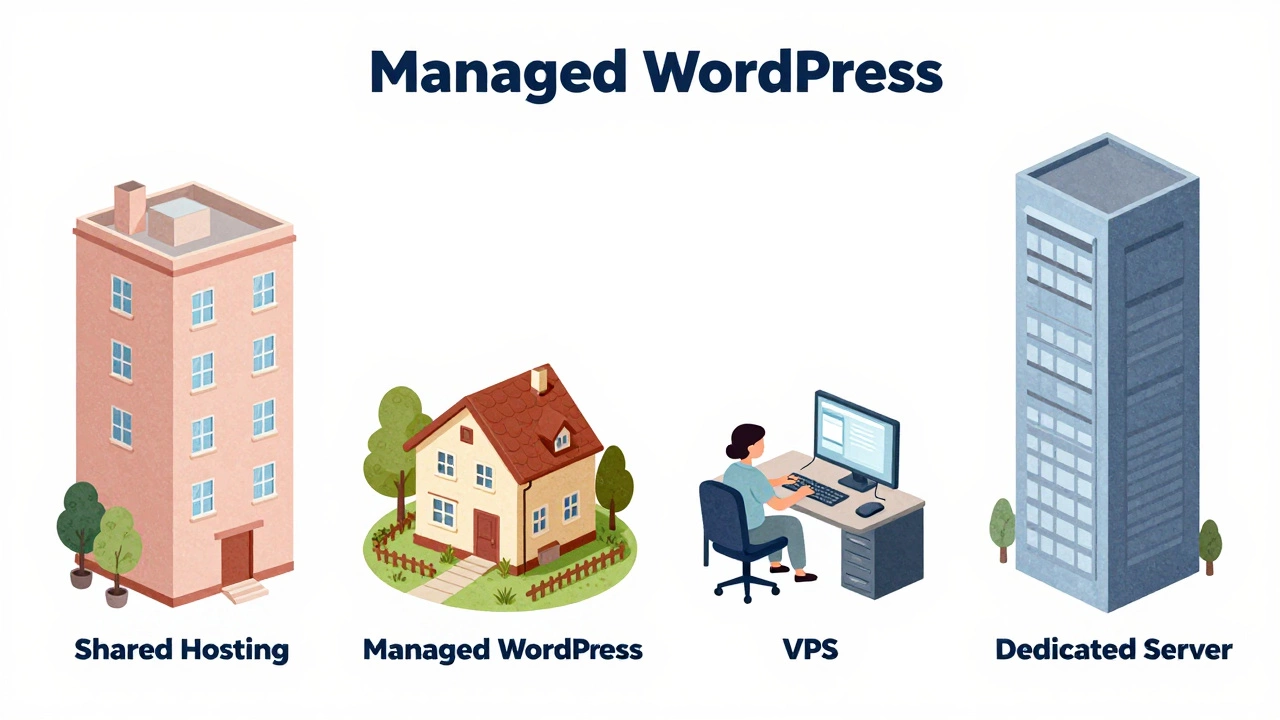
Shared hosting is the most common choice. It’s like living in an apartment building-multiple sites share the same server. It’s affordable and easy. Managed WordPress hosting is perfect if you use WordPress. The provider optimizes the server specifically for WordPress and handles updates automatically. VPS hosting gives you more control, like renting your own apartment in a building. Dedicated servers are for big companies needing full control. For most people, shared or managed hosting is all you need.
How to Choose the Right Hosting Provider
Start by asking: What’s your website’s purpose? A simple blog? An online store? A portfolio? Then check three things:
- Uptime guarantee: Look for 99.9% or higher. If a site is down 0.1% of the time, it’s offline about 43 minutes a month. That’s too long for business sites.
- Support quality: Test their chat or ticket system before signing up. Good providers respond within minutes. Poor support means you’ll be stuck if something goes wrong.
- Ease of use: Check if they offer one-click installs for WordPress or other tools. Avoid providers with complicated dashboards if you’re new.
For example, if you’re running a small bakery website, shared hosting with free SSL and 24/7 support is enough. No need for expensive VPS plans. Most providers let you start small and upgrade later as your site grows.
Common Mistakes to Avoid
Many people make simple errors when choosing hosting:
- Choosing the cheapest option: Hosting for $1/month often has slow speeds, frequent downtime, or hidden fees. You get what you pay for.
- Ignoring SSL certificates: Modern browsers flag sites without SSL as "unsafe." Most providers include free SSL now-never skip this.
- Overcomplicating setup: If you’re new, avoid VPS or dedicated servers. Start with managed hosting. You can always switch later.
- Not checking renewal prices: Many companies offer low intro rates but triple prices after the first year. Always read the fine print.
For instance, a friend of mine signed up for a $2/month deal. After 12 months, it jumped to $30/month. He didn’t realize until his site went offline. Always check long-term costs.

Your Step-by-Step Setup Guide
Setting up hosting is easier than you think. Here’s how:
- Choose a provider: Pick one with good reviews and support. SiteGround and Bluehost are great for beginners.
- Select a plan: Start with shared or managed WordPress hosting. Most offer a free domain for the first year.
- Connect your domain: If you already have a domain (like yourname.com), link it during setup. New users can buy one through the host.
- Install your site: Use the one-click installer for WordPress or your preferred platform. It takes less than 5 minutes.
- Upload content: Add your pages, images, and text. Most hosts include drag-and-drop editors.
- Test everything: Check links, forms, and mobile responsiveness before going live.
This process takes under an hour. You don’t need technical skills-just follow the instructions. The hosting provider handles server maintenance, security patches, and backups automatically.
When You Might Need Help
While most people can set up hosting themselves, there are cases where professional help makes sense:
- Complex e-commerce sites: If you’re selling hundreds of products or need custom payment systems, a developer can optimize performance and security.
- High-security needs: Financial or healthcare sites often require specialized security setups that professionals handle.
- Scaling issues: If your site suddenly gets thousands of visitors (like after a viral post), experts can adjust server settings quickly.
But even then, you don’t hire someone to "host" your site. You hire them to manage or optimize your existing hosting setup. For 90% of small businesses and personal sites, DIY hosting works perfectly.
Final Thoughts
Hosting isn’t about hiring people-it’s about choosing the right service. You pay a company to rent server space, not to do the work for you. Most hosting providers make setup effortless with intuitive tools and support. Start simple, avoid overpaying, and focus on your content. If your site grows, you can upgrade later. The truth is simple: you don’t need someone to host your website-you just need the right hosting provider.
Do I need a domain name to host my website?
Yes, a domain name is required. It’s the address people use to find your site (like example.com). Hosting provides the server space, while the domain is the name. Most hosting providers let you register a domain or connect an existing one during setup.
Can I host my website myself using my home computer?
Technically yes, but it’s not practical. Home internet connections lack the speed and reliability businesses need. Power outages, security risks, and constant maintenance make self-hosting unreliable. Hosting providers have data centers with backup power, security, and fast connections. It’s safer and more affordable to use a professional service.
What’s the difference between hosting and a domain?
Think of a domain as your website’s address (like 123 Main St) and hosting as the physical building where your site lives. You need both. The domain points visitors to the server where your files are stored. Without hosting, your domain has nowhere to go. Without a domain, visitors can’t find your site.
Is shared hosting secure enough for my business?
Yes, for most small businesses. Reputable hosting providers isolate each site on shared servers and include firewalls, malware scanning, and regular backups. However, if you handle sensitive data (like credit card details), you’ll need PCI compliance-which most shared hosts don’t offer. In that case, choose a managed WooCommerce or dedicated hosting plan.
How do I know if I need to upgrade my hosting?
Watch for these signs: slow loading times (over 3 seconds), frequent downtime, or error messages like "server overloaded." If your site gets more than 10,000 monthly visitors on shared hosting, consider upgrading. Most providers have simple upgrade options in your dashboard. Don’t wait until your site crashes-check performance regularly.