HTML/CSS Readiness Checker
This tool helps you assess if you have the necessary HTML and CSS foundation to start learning JavaScript. Based on the article's recommendations, answer these 5 essential questions about your skills.
If you’re just starting out in web development, you’ve probably heard the same advice over and over: learn HTML and CSS before JavaScript. But is that really true? Or is it just a myth passed down from developers who learned in the early 2000s? The answer isn’t as simple as yes or no-but it’s not complicated either. Let’s cut through the noise and give you a real, practical roadmap based on how the web actually works today.
Why HTML and CSS Come First
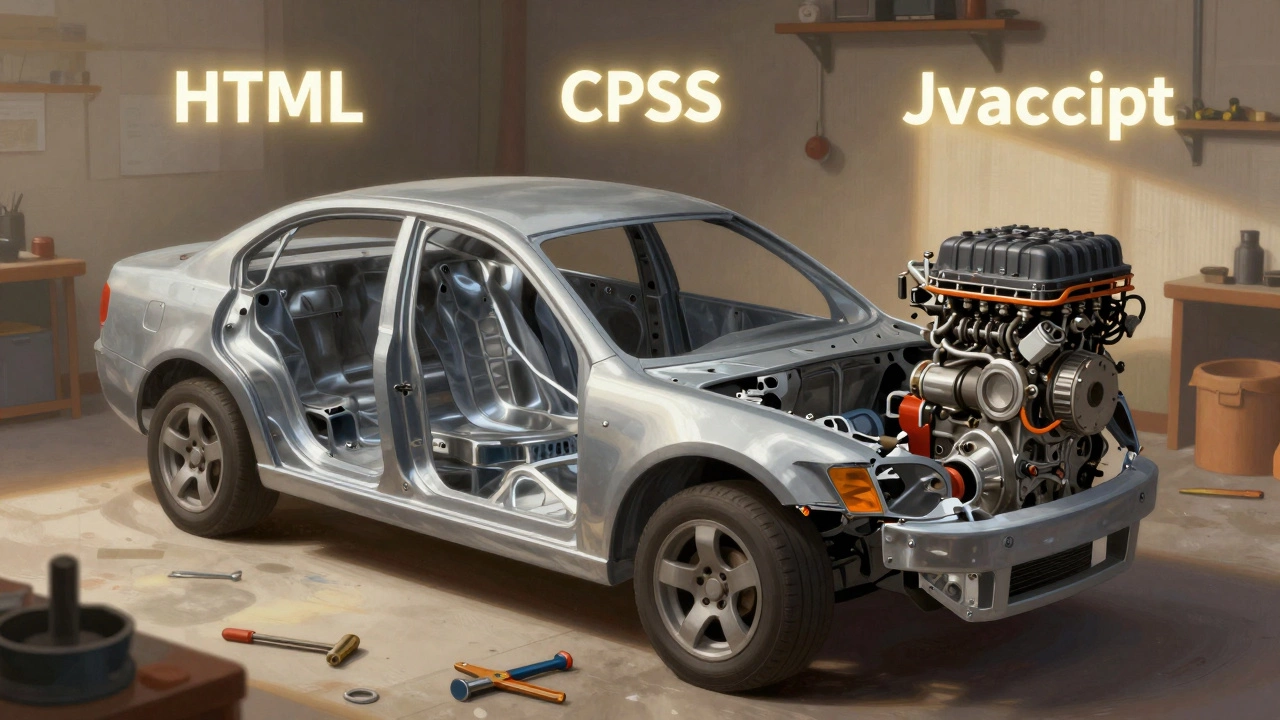
HTML is the skeleton of every webpage. It’s what defines the structure: headings, paragraphs, buttons, images, forms. Without it, there’s nothing for JavaScript to interact with. CSS is the skin-it controls how that structure looks: colors, spacing, fonts, layout. JavaScript is the muscle. It makes things move, respond, and change.
Think of it like building a car. You don’t start by installing the engine before you’ve built the frame. You lay the chassis first, then add the body, then the engine. Same with websites. You need the structure (HTML) and the design (CSS) before you can make it interactive (JavaScript).
Here’s a real example: you want to create a button that changes color when clicked. If you write JavaScript first, you’ll end up writing code like this:
document.getElementById('myButton').style.backgroundColor = 'red';But what if that button doesn’t exist yet? Because you didn’t write the HTML. Or what if it’s not styled properly? Because you didn’t write the CSS. Now you’re debugging two layers you didn’t even build yet. That’s messy.
What Happens When You Skip HTML and CSS
I’ve seen too many beginners jump straight into JavaScript because they think it’s the "cool" part. They follow tutorials that show them how to make animations or fetch data from APIs-and they feel powerful. But then they hit a wall.
They try to select an element with document.querySelector() and get null. Why? Because the HTML element wasn’t written yet. Or they write a CSS rule that centers a div, but their JavaScript moves it 200px to the right-and now it’s misaligned. They don’t understand why because they never learned how CSS positioning works.
A 2024 survey of 2,300 new developers by Frontend Masters found that 68% of those who skipped HTML and CSS first struggled with basic DOM manipulation. The root cause? They didn’t understand the structure they were trying to control.
How Much HTML and CSS Do You Really Need?
You don’t need to become a CSS wizard before touching JavaScript. But you do need enough to build a simple, functional page.
Here’s what you should master before writing your first JavaScript:
- HTML: Writing semantic tags (
<header>,<section>,<button>,<form>), linking images, creating basic forms with inputs and labels - CSS: Applying styles with selectors, using
display: blockandinline-block, understanding margins and padding, centering elements withmargin: 0 auto, using basic flexbox for layout
That’s it. You don’t need to know grid, animations, or media queries yet. Just enough to make a page that looks like a real webpage-not a blank screen with a single button floating in the top-left corner.
When JavaScript Makes Sense Earlier
There are exceptions. If you’re building a simple interactive tool-like a calculator or a to-do list-you might want to start with a tiny bit of JavaScript early on. But even then, you still need the HTML structure and basic CSS styling to make it usable.
Try this: open a blank HTML file. Write this:
<!DOCTYPE html>
<html>
<head>
  <title>My First Button</title>
</head>
<body>
  <button id="clickMe">Click me</button>
  <script>
    document.getElementById('clickMe').addEventListener('click', () => {
      alert('You clicked me!');
    });
  </script>
</body>
</html>
Open it in your browser. It works. You just used JavaScript-but only because you had the HTML button already there. You didn’t skip the foundation. You built it quickly and moved on.
That’s the sweet spot: build the bare minimum structure and style, then add interaction. Don’t delay JavaScript, but don’t rush past the basics either.
The Learning Path That Works
Here’s a realistic, step-by-step plan that’s helped hundreds of students in Dublin coding bootcamps:
- Week 1: Learn HTML basics. Build a simple profile page with a photo, name, bio, and link.
- Week 2: Add CSS. Style that page-change fonts, colors, center the text, add a border. Make it look like something a person would actually visit.
- Week 3: Add one JavaScript interaction. Make a button that changes the background color when clicked. Or make a toggle that shows/hides the bio.
- Week 4: Build a small form. Add validation with JavaScript-check if an email field has an @ symbol.
By the end of four weeks, you’ve built something real. You understand how the three layers work together. You’re not guessing anymore. You know why your code works-or why it breaks.
What Comes After
Once you’re comfortable with HTML, CSS, and basic JavaScript, you’ll naturally start asking: "How do I make this look better on phones?" That’s responsive design. "How do I reuse this button on other pages?" That’s components and reusable code. "How do I fetch data from an API?" That’s async JavaScript and fetch().
Each step builds on the last. You don’t need to master everything before moving forward. But you do need to understand the foundation.
Myths Debunked
Myth: "JavaScript is the future, so I should skip HTML and CSS."
Reality: Every website still needs HTML and CSS. Even AI-generated sites output HTML and CSS. JavaScript enhances them-it doesn’t replace them.
Myth: "I can learn all three at once."
Reality: You can, but you’ll get overwhelmed. Your brain needs to lock in one layer before adding another. It’s like learning to drive: you don’t learn steering, braking, and gear shifting all on day one.
Myth: "I’m a fast learner, I’ll pick it up as I go."
Reality: You will pick it up-but you’ll spend twice as long debugging because you don’t know what’s wrong. Was it the JavaScript? The CSS? Or did you forget the closing tag in your HTML? You’ll waste hours guessing.
Final Advice
Yes, you should learn HTML and CSS before JavaScript-not because someone said so, but because it’s how the web is built. It’s not about following rules. It’s about working with the system, not against it.
Start small. Build one page. Add one button. Make it do something. Then make it look good. Then make it respond. That’s the path. No shortcuts. No magic. Just clear, step-by-step progress.
If you do this right, in six weeks you’ll have a portfolio piece that looks better than 80% of the "I learned JavaScript in 3 days" projects you see online. And you’ll actually understand why it works.
Do I need to know HTML and CSS to use JavaScript frameworks like React?
Yes. React is a JavaScript library, but it still generates HTML and applies CSS under the hood. If you don’t understand how HTML elements work or how CSS styles are applied, you’ll struggle to debug layout issues, style components, or understand why your JSX isn’t rendering correctly. React doesn’t replace HTML and CSS-it uses them.
Can I learn JavaScript first and pick up HTML and CSS later?
Technically, yes-but you’ll hit walls quickly. You can write JavaScript in a console or Node.js without HTML, but you won’t be building websites. Frontend JavaScript exists to manipulate the DOM, which is made of HTML and styled with CSS. Without those, you’re just writing code that does nothing visible. You’ll feel stuck, frustrated, and confused.
How long should I spend on HTML and CSS before starting JavaScript?
Two to four weeks of consistent practice is enough. You don’t need to master every CSS property. Focus on building 3-5 simple pages with clean structure and basic styling. Once you can create a page with a heading, image, button, and form-and make them look decent-you’re ready to add JavaScript.
What if I only want to work with backend JavaScript (Node.js)?
Then you don’t need HTML and CSS for server-side code. But if you ever plan to build full-stack apps, even just a simple admin panel or API documentation page, you’ll need them. Most jobs that use Node.js still require some frontend knowledge. It’s rare to find a backend-only role that doesn’t require at least basic UI understanding.
Is it possible to learn HTML, CSS, and JavaScript together without getting overwhelmed?
Yes-but only if you structure it right. Don’t try to learn everything at once. Focus on one layer at a time. Spend a week on HTML, then a week on CSS, then add JavaScript on top. Use small projects to connect them: build a page, style it, then make one thing interactive. That’s how you avoid burnout and build real understanding.
Next Steps
Open your code editor right now. Create a new folder called "my-first-page". Inside, make three files: index.html, style.css, and script.js. In the HTML file, write a heading and a button. In the CSS file, center the button and give it a color. In the JavaScript file, make the button change the background color when clicked. Save, open in your browser, and see it work.
That’s it. You’ve just started. No tutorials. No fluff. Just the real thing.