
Hosting Recommendation Tool
Answer these three quick questions to find out which hosting environment fits your website best.
Recommended: -
Please select an option from each category to see your recommendation.
To get a handle on this, we need to distinguish between your files and the place they live. When you build a site on your laptop, you're using a local environment. It works great for you because the browser is looking at files sitting right on your hard drive. But for someone in another city to see your work, those files need to be on a machine that is turned on 24/7, connected to a high-speed internet line, and configured to talk to the global web. That's exactly what website hosting is a service that provides the storage and computing power needed to make a website accessible over the internet. Also known as web hosting, it acts as the bridge between your code and your visitors.
The Localhost Trap: Why Your Site Isn't Public
If you aren't hosting your site, you're likely working on a Local Server. This is a piece of software-like XAMPP or LocalWP-that tricks your computer into thinking it's a web server. You'll see addresses like "localhost" or "127.0.0.1" in your browser. This is a fantastic way to develop and test without breaking things for the public, but it's a dead end for growth.
The main problem is reach. Your computer is designed for personal use, not for handling thousands of simultaneous requests from around the globe. Even if you tried to open your computer's ports to the world, your home internet connection would likely crash the moment more than five people tried to visit. Most home routers aren't built to manage the traffic flow required for a professional site, and your ISP would probably block you for violating their terms of service regarding residential use.
Domain Names vs. Hosting: A Common Confusion
One of the biggest mistakes beginners make is thinking that buying a Domain Name is the same as hosting. Let's clear that up. A domain-like example.com-is essentially just a digital pointer. It's like an entry in a phone book. When someone types your domain into a browser, the DNS (Domain Name System) tells the browser, "Go to this specific IP address to find the files."
If you have a domain but no hosting, the DNS has nowhere to point. Your visitor will hit a "Server Not Found" error or a generic holding page from the domain registrar. You've bought the sign for the store, but you haven't rented the building. To make the site live, you have to link your domain to a Web Server that actually holds your HTML, CSS, and images.
| Feature | Domain Name | Web Hosting |
|---|---|---|
| Purpose | The address people type | The place where files live |
| Analogy | The street address | The physical house |
| Typical Cost | Annual fee ($10-$20/yr) | Monthly/Annual fee ($3-$50/mo) |
| What happens if missing? | Site exists but has no name | Name exists but no site to show |

The Technical Reality of What You're Missing
When you decide to move from a local folder to a professional hosting environment, you gain more than just "visibility." You gain an infrastructure designed for stability. Professional hosts provide Uptime, which is the percentage of time your site is online. If you tried to host your own site on an old laptop in your bedroom, a simple power outage or a Windows update restart would take your entire business offline. Professional data centers have backup generators and redundant power supplies to prevent this.
Then there's the matter of security. Hosting providers offer SSL Certificates. These are the digital certificates that turn "http" into "https" and put the little padlock in your browser bar. Without this, modern browsers like Chrome or Safari will scream at your visitors that your site is "Not Secure," which is a great way to scare away 90% of your traffic instantly.
You also get specialized tools that make managing a site possible. Think about FTP (File Transfer Protocol) or SSH access, which let you upload files securely. Or consider the automatic backup systems. If you accidentally delete a critical folder on your local machine, you might be out of luck. With hosting, a one-click restore can save you from a total disaster.
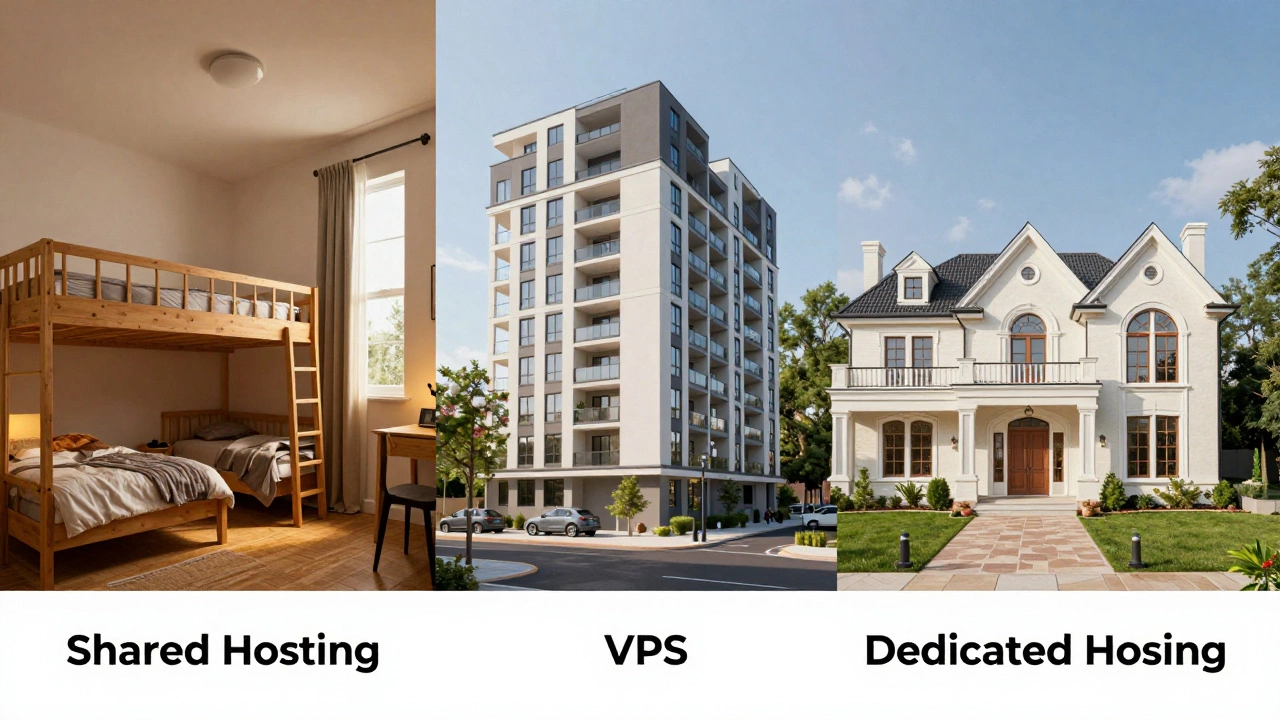
Choosing the Right Path: Hosting Types for Different Needs
Depending on what you're building, you don't always need the same kind of hosting. If you're just starting a blog or a portfolio, Shared Hosting is the standard entry point. It's cheap because you're sharing a server with hundreds of other websites. It's like renting a room in a large boarding house; you have your own space, but you share the plumbing and electricity.
As your traffic grows, you might move to a VPS (Virtual Private Server). This gives you a dedicated slice of the server's resources. It's more like a condo-you still share the building, but your walls are thicker, and you have more control over your own utilities.
For those running high-traffic e-commerce stores or complex apps, Dedicated Hosting or Cloud Hosting (like AWS or Google Cloud) is the way to go. This is the equivalent of owning your own mansion. You have total control, maximum security, and all the power of the hardware is yours alone.

Common Pitfalls and How to Avoid Them
One of the biggest traps is the "Free Hosting" lure. Many companies offer free plans to get you in the door. While this sounds great, it usually comes with a heavy price. You might find your site plastered with ads you can't remove, or worse, the host might suddenly delete your site because you didn't pay for a premium upgrade. If you're serious about your project, a few dollars a month for a reputable host is a tiny investment compared to the risk of losing your data.
Another mistake is ignoring the location of the server. This is called Latency. If your target audience is in London but your server is in Singapore, the data has to travel across the world for every single click. This adds milliseconds of delay. While it sounds small, users are impatient. A one-second delay in page load time can lead to a significant drop in conversion rates.
The Roadmap to Going Live
If you're currently staring at a beautiful website that only you can see, here is the exact sequence you need to follow to make it a reality:
- Finalize Local Development: Make sure your links are relative, not absolute. If your image links to "C:/Users/Landon/Desktop/image.jpg", it will break the moment it hits a server.
- Pick a Hosting Plan: Match your plan to your expected traffic. Start with Shared if you're unsure; you can always upgrade later.
- Register/Link Your Domain: Point your domain's Name Servers to your host's DNS.
- Upload Your Files: Use an FTP client or the host's File Manager to move your files from your computer to the
public_htmlfolder on the server. - Configure the Database: If you're using WordPress or a custom PHP app, create a MySQL database on your host and update your
wp-config.phpor configuration file with the new credentials. - Install SSL: Activate your Let's Encrypt or paid SSL certificate to ensure the site is secure.
Can I host my own website on my own computer for free?
Technically, yes. You can install server software like Apache or Nginx and open your router's ports. However, it's a bad idea for 99% of people. Your computer would have to stay on 24/7, your electricity bill would rise, and your home network would be exposed to security risks and hackers. Most residential ISPs also forbid this in their terms of service.
Will my site be deleted if I stop paying for hosting?
Yes. Hosting is a subscription service. Once your payment fails or the subscription expires, the host will typically suspend your account first. After a grace period (usually 30 days), they will permanently delete your files from their servers. Always keep a local backup of your site to avoid this.
Do I need hosting if I use a site builder like Wix or Squarespace?
In these cases, hosting is bundled into the price. You aren't managing a separate server because the platform handles the infrastructure for you. You're essentially paying for a "Software as a Service" (SaaS) package where the builder and host are the same company.
How long does it take for a site to appear online after hosting is set up?
The files upload almost instantly, but the "propagation" of DNS takes time. This is the period where servers around the world update their records to know where your domain is pointing. It usually takes anywhere from a few minutes to 48 hours.
What is the difference between a local server and a live server?
A local server exists only on your physical machine and is accessed via your internal network (localhost). A live server is a powerful machine in a data center connected to the public internet, allowing anyone with a URL to access your content regardless of where they are in the world.